Agents work for minutes at a time, so you'll often be somewhere else when one needs you. Styx tells you the moment an agent stops for you, wherever you are. It doesn't interrupt you because an agent is working or has finished a turn.
When Styx notifies you
An agent "needs you" when it has stopped mid-task and can't go on without you:
- it asks you a question;
- it has a plan ready for you to approve;
- it wants permission to run something its permission mode doesn't allow;
- it asks for access to a deploy target or server.
That task becomes Your turn everywhere at once: the project's Work list, the Agents board, the Needs you counter on Home and the count in the title bar. Answering in any one of those places clears it in all of them, along with the notifications below.
Styx also shows a toast when a deploy finishes while its dialog is closed, and a banner over the window when something blocks agents, such as expired credentials for a target, a missing agent CLI or a merge conflict. Each banner carries the action that fixes it.
In the app
A toast slides in at the top right: Needs you, what the agent wants (for an access request, the agent, the target and the scope), and the project and branch. Review opens the task (and, for an access request, the request itself); Later puts it aside. The count in the title bar ("2 needs you") takes you to what's waiting.
On your computer
| macOS | Windows (beta) | Linux (beta) | |
|---|---|---|---|
| Count | A badge on Styx's Dock icon with the number of open requests. | A badge on Styx's taskbar button. | — |
| Getting your attention | The Dock icon bounces once, the first time something needs you. It doesn't bounce again until everything has been answered. | The tray icon gets an accent dot. | The tray icon gets an accent dot. |
| Notification | In Notification Center, with Review and Later. | In Action Center, with Review and Later. | A desktop notification. |
| Menu | The Dock icon's menu lists what needs you. | The tray icon's menu lists what needs you; clicking the icon opens the Agents board. | Same as Windows. |
Clicking a notification, or Review on it, brings Styx forward on that request.
On Linux the tray icon shows on KDE out of the box. GNOME needs the AppIndicator extension, which most distributions include.
The agent dock
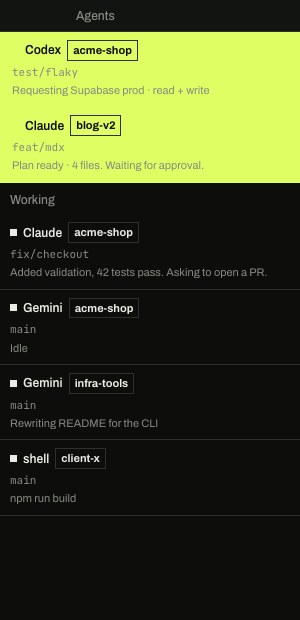
The agent dock is a narrow window, 300 pixels wide, that stays on top of your other windows and lists every agent that needs you, across all your projects. Below them it lists the agents that are working. It's meant for noticing, not working: click a card and the main Styx window comes forward on that task.
Open it from the palette (⌘K (CtrlK on Windows and Linux)) with Open agent dock. It closes when the main window closes.
Keep it at the edge of your screen while you work in your editor, and you'll see a question the moment it's asked without switching windows.
Making it quieter
- Do Not Disturb, a checkbox in the Dock icon's menu on macOS and the tray icon's menu on Windows and Linux, stops the toasts and system notifications. The counts and badges still update, so nothing is lost; you just aren't interrupted.
- Notify when it needs me is a toggle on each task, set when you start it (under the box in New task). Turn it off for a task you'll check on yourself, and that task won't notify you at all; it still shows as Your turn in the app. The default for new tasks can be set in
.styx/project.json(agents.notifyWhenNeedsMe). - Settings › General › Notify when an agent needs me: Badge + sound (the default) plays the system sound with each notification; Badge keeps them silent.
Because answering anywhere clears it everywhere, a notification you've already dealt with in another window disappears on its own.