The Changes tab is a task's work as one page you can sign off: where it stands, what it was for, and every change the agent made, grouped by the message that asked for it. From there you land it, ask for more, or take back the part you don't want.
What a turn is
A turn is one message from you and everything the agent does in reply, until it stops and waits for you again. Styx records the state of the task's files at the start and at the end of every turn. That record, a checkpoint, is what lets you see exactly what one turn changed and put it back.
Checkpoints are kept as hidden git refs in your repository (under refs/styx/checkpoints/). They are never on your branch, never pushed, and don't touch your index or your commits. They're cleaned up when the task is archived or its worktree is removed.
In the chat
When a turn changes files, it ends with a result card in the chat: the agent's last reply, how long the turn took ("Done in 4 min"), how many files changed with lines added and removed, and pictures of your app before and after if it was running in Preview. The card has two buttons:
- Show changes opens that turn's diff.
- Undo this turn puts the files back (see below).
There's no accept step. If you carry on, the turn is kept; its receipt says "Kept" with the time.
The Changes tab
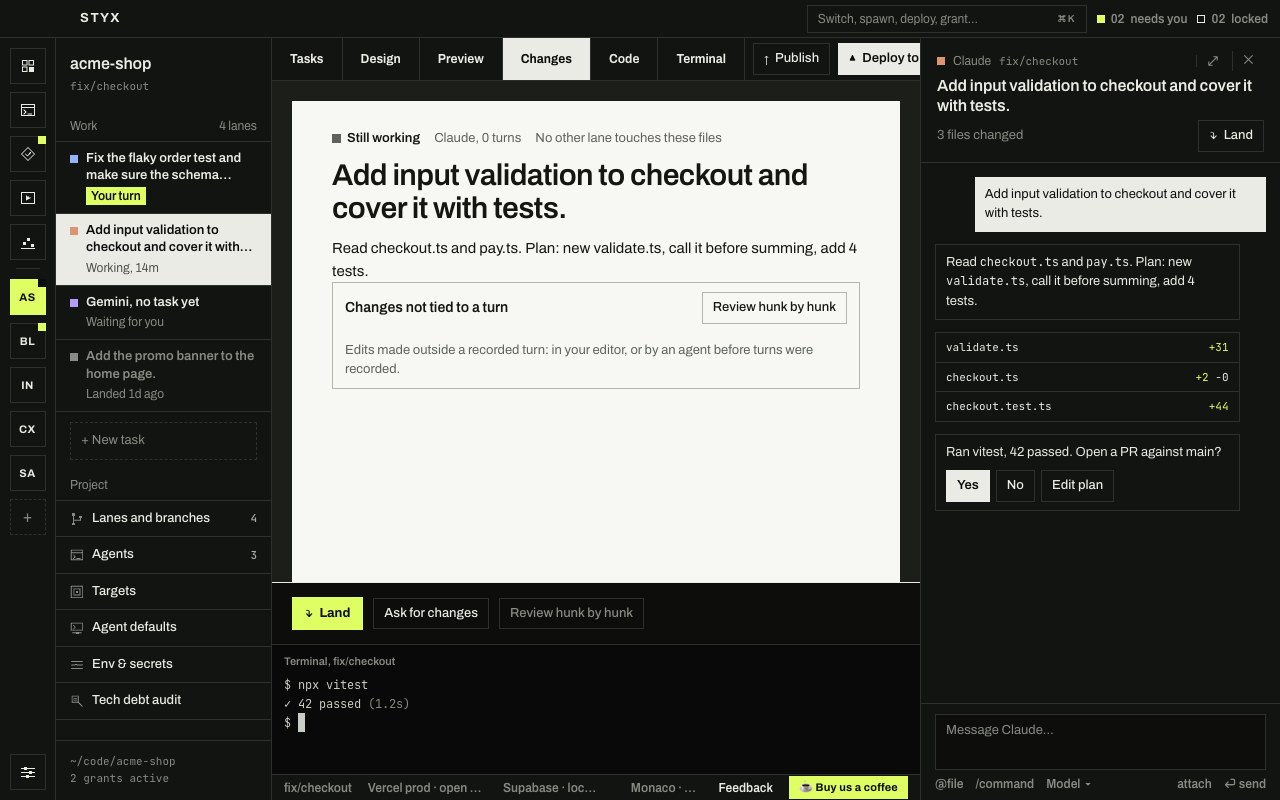
The page opens with where the task stands (Ready to land, Still working, Waiting on you…), the task itself, which agent did it and in how many turns, and whether another lane has changed the same files ("Also changed in" and the branch, or "No other lane touches these files"). Then comes what the agent last said.
Under What it did, turn by turn, each turn is titled by what you asked, with its file and line counts. Show fetches its diff; Undo this turn takes it back.
Edits that no turn accounts for, such as changes you made in your own editor, are listed separately under Changes not tied to a turn.
At the bottom is the decision:
- Land brings the work into
main. See Land, publish and deploy. - Ask for changes puts the cursor in the chat's message box, so you can tell the agent what to do next.
- Review hunk by hunk opens the hunk review (see below).
Undo a turn
Undo this turn asks first: "Take back the changes this turn made? Later turns and your own edits stay." Undo it goes ahead; Keep it cancels.
What it does:
- It takes back that turn's changes, and only those. Lines the turn changed go back to how they were; files it created are deleted; files it deleted come back. Binary files work the same way. Files your
.gitignoreexcludes are left alone. - Later turns and your own edits stay. Undoing an earlier turn keeps everything that happened after it, including changes you made yourself. Only that turn is marked undone. For the most recent turn, with nothing after it, the files end up exactly as they were before it.
- It refuses rather than guess. If a later turn or one of your edits changed the same lines, the turn can't be taken out on its own. Styx changes nothing and says which files are in the way ("Could not undo turn 2 on its own: later changes touched the same lines in checkout.ts…"). Ask the agent to undo that change instead, or revert the hunk yourself (below).
- It doesn't touch git history. It makes no commit and removes none. If the agent committed during the turn, the commit stays, and the undo shows up as uncommitted changes on top of it.
- It waits for the agent. You can't undo while a turn is running or waiting on you ("Wait for the agent to finish before undoing").
- The agent is told. A line in the chat ("Turn 2 was undone: the changes it made were taken back. Later changes stay.") is also passed to the agent ahead of your next message, so it doesn't build on work that's gone.
Revert a single hunk
To keep most of a turn and drop one part, use the hunk review.
- Turn on edit tracking. Open Settings › Editor and turn on Track agent edits (diff review). It's off by default because watching every edit can slow Styx down; until it's on, the review says "Agent edit tracking is off".
- Open the review. On the Changes tab, press Review hunk by hunk. In the Code tab, the bar over the editor ("3 hunks from Claude") has Review too.
- Revert what you don't want. Move through the hunks with j and k, press r to revert the one in focus, and ⌘⏎ (CtrlEnter on Windows and Linux) when you're done.
The agent has already applied its edits, so there's nothing to accept: a hunk is either kept as it is or reverted. Revert all reverts every hunk from that agent, and Mark reviewed marks what's left as seen.
Ask for changes
Most of the time the quickest fix is to tell the agent. Ask for changes puts you in the chat. You can also point at the problem: Select to fix in Preview sends the element and a picture, and selecting on a design screen does the same for a design.